A self-hosted file platform with resumable uploads up to 500 GB per file, folder-specific permissions, public share links and live transfer monitoring.
VSO File Sharing↗
Expand full screenshot ↓Collapse screenshot ↑
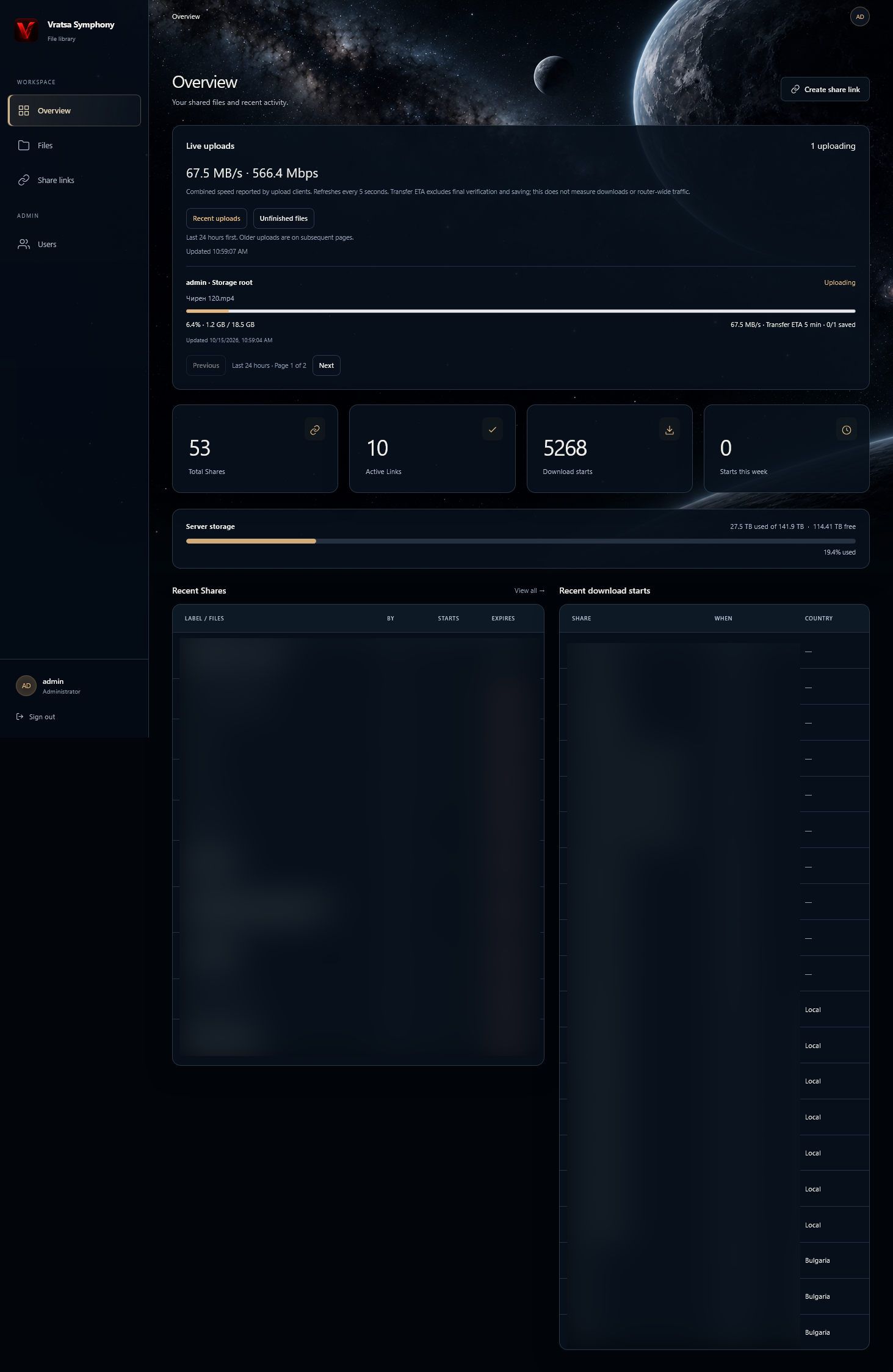
File Sharing Platform — file management and sharing dashboard.
About the project
A file sharing platform deployed at data2.vso.bg. Users can upload and download files, organize folders and share selected content with other people through a link.
A recipient receives access to the shared file or folder rather than access to the rest of the platform’s content.
INSIDE THE PROJECT
Features & capabilities
Explore the tools and workflows built into this project.
EXPLORE BY CATEGORY
01CAPABILITIES01 / 11
File management and interface
Browse existing storage with breadcrumbs, folder grid/list views, current-directory name search and sorting by name, newest or largest. View file sizes, extensions and modification dates.
Create folders, rename, copy, move and delete items within permitted storage. Context menus, multiple selection and confirmation dialogs support everyday tasks.
Responsive desktop, tablet and mobile layouts use a dark space-inspired appearance, clear status messages and navigation for Overview, Files, Share Links and user administration.
02CAPABILITIES02 / 11
Large-file uploads
Upload up to 500 GB per file with no application-enforced storage quota per account. Actual capacity depends on available storage and server configuration.
Queue multiple files, drag and drop files/folders and preserve relative directory structures. Empty folders are not included.
Accept general file types, including audio projects such as .ptx, media, documents and archives, without an extension allowlist.
Preserve existing files by assigning numbered names to conflicting uploads. Show queued, uploading, failed and saved states; count files as saved only after server confirmation.
Display transferred bytes, speed, elapsed/remaining time, actionable errors and request identifiers.
03CAPABILITIES03 / 11
Transfer reliability and performance
Split uploads into independently transferable chunks with SHA-256 verification and adaptive concurrency of up to eight simultaneous upload requests.
Pause and resume transfers, retry temporary failures with increasing delays and recover retained progress after refresh by reselecting original files in the same browser profile.
Verify retained chunks against selected files before resuming. Keep upload state in persistent application storage and incomplete files out of normal browsing and sharing.
Assemble and verify all parts before publishing a finished file. Throughput depends on the connection, browser, proxy, server and storage.
04CAPABILITIES04 / 11
Folder-specific user access
Administrators manage all storage and application settings. Employees can browse, upload and share across storage.
Folder Read Only users can browse, preview and share within one assigned folder and its descendants.
Folder Read & Write users can also upload, create folders, rename, copy, move and delete within their assigned folder.
Server-side checks enforce folder boundaries independently of the interface. Access changes apply to subsequent requests.
05CAPABILITIES05 / 11
Public sharing links
Share an individual file, multiple files or a folder with recipients who do not have accounts, limiting access to the shared content.
Label links, set an expiry or keep them available until revoked, and copy them directly from the interface.
Recipients can preview supported media, download selected files separately or choose an optional ZIP for multiple files and folders.
Administrators can inspect, search and revoke team sharing links by name, file, owner and status.
06CAPABILITIES06 / 11
Downloads and recipient experience
Use native browser downloads with HTTP byte-range support for individual files. PHP authorizes access and nginx delivers file content.
Download multiple files separately in batches of two without first creating an archive, or choose a generated streamed ZIP.
Show file sizes, total size, expiry and guidance on destination/free space.
Generated ZIP downloads cannot resume. Individual-file resume requires a valid link, an unchanged file and a compatible download client.
07CAPABILITIES07 / 11
Media previews
Preview supported audio, video, images and PDFs in the browser, including through public sharing links without an account.
Playback and previews depend on the browser’s supported formats, codecs and PDF capabilities.
08CAPABILITIES08 / 11
Administration and live monitoring
View share totals, active links, recent shares, download requests and storage capacity/free space for full-storage accounts.
Monitor upload speed in MB/s and Mbps, username, destination, current files, overall progress, bytes, confirmed saved files and estimated remaining time, refreshed every five seconds.
Speeds are reported by upload clients, and estimates exclude final verification/saving. Download statistics and logs count starts, not verified completed transfers; logs include timestamps and IP addresses.
Review the last 24 hours of uploads first, with older paginated history. Inspect incomplete files and retained upload data.
Clean abandoned transfers from the administrator interface or a maintenance command. Cleanup rejects active/locked uploads and preserves completed files.
09CAPABILITIES09 / 11
Users and sessions
Create/delete users, reset passwords as administrator, edit roles and folder assignments, and search the user list.
Review account creation and last-login information. Sessions use persistent storage, a 24-hour inactivity timeout and renewal during active uploads.
10CAPABILITIES10 / 11
Security controls
bcrypt password hashes, login throttling and CSRF protection for state-changing forms and requests.