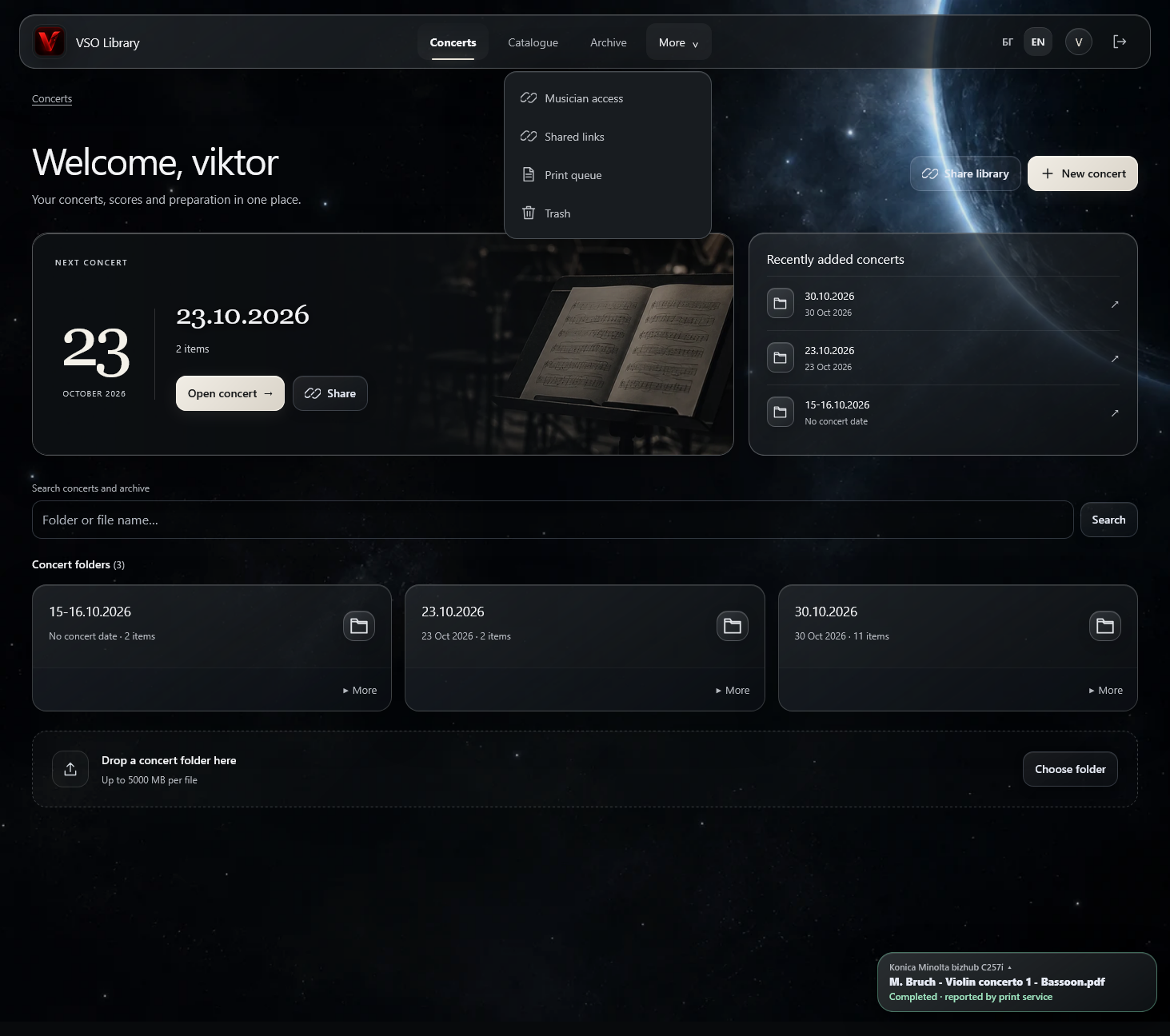
A self-hosted score library for concert organization, private musician sharing, PDF print preparation and network print queues.
Noti — Digital Score Library↗
Noti — score library, concert folders and print preparation.
A CLOSER LOOK
See the workflow.
Illustrated workflow · sample interface. The application requires authorised access.
01 / 03
NOTIWORKFLOW ILLUSTRATION
SAMPLE MATERIAL · NO PRIVATE SCORES
A library with structure.
▤Work A / Score.pdfEXAMPLE
▤Work A / Violin I.pdfEXAMPLE
▤Work B / Flute.pdfEXAMPLE
Catalogue → score material
Illustrative explanation · no live connection
01Organise the library
NOTIWORKFLOW ILLUSTRATION
SAMPLE MATERIAL · NO PRIVATE SCORES
One concert. Prepared parts.
▤Concert folder / Work AEXAMPLE
▤Concert folder / Work BEXAMPLE
▤PDF print preparationEXAMPLE
Concert folder → print preparation
Illustrative explanation · no live connection
02Prepare a concert
NOTIWORKFLOW ILLUSTRATION
SAMPLE MATERIAL · NO PRIVATE SCORES
The right part. The right musician.
▤Musician / Violin IEXAMPLE
▤Concert folder / Prepared partEXAMPLE
▤Scoped share / Selected materialEXAMPLE
Selected material → private musician access
Illustrative explanation · no live connection
03Share with musicians
A permanent music catalogue keeps works and their score material together.
Concert folders collect the prepared material for a programme; PDF tools support print preparation.
Private musician access distributes prepared parts without exposing the whole library.
About the project
A private notation library at noti.vso.bg. The application brings score organization and concert preparation into a shared workflow.
Concerts can be created and prepared scores shared with the orchestra’s musicians, helping keep the material for a programme together. Access requires an account.
INSIDE THE PROJECT
Features & capabilities
Explore the tools and workflows built into this project.
EXPLORE BY CATEGORY
01CAPABILITIES01 / 10
Concert and score management
Organize concert folders in a directory tree with nested works and instrument parts. Upload complete folders while preserving their structure, including PDFs, images, Word documents and other files.
Create, rename and remove files or folders, and search within a selected folder or across concerts and archives.
Archive concerts automatically after their date, keeping existing share links active.
Recover deleted material from Trash for 30 days, to its original location or another folder. Print adjustments preserve original files, and conflicting filenames receive numbered suffixes.
02CAPABILITIES02 / 10
Private music catalogue
Keep a permanent score collection separate from active concerts and musician-facing pages. Import an existing composer/work/part hierarchy from server storage.
Browse composers 20 per page with work counts and expandable pieces. Search by composer, work, catalogue number or instrument using file and folder names.
Case- and accent-insensitive matching includes common English/Bulgarian composer and instrument aliases.
Copy complete works or selected parts into concerts without changing catalogue originals. Imports, copies and comparisons continue on the server after the browser closes.
03CAPABILITIES03 / 10
Catalogue enrichment
Compare uploaded concert material with the permanent collection and review proposed additions, composer/work destinations and new folders before confirming them.
Reuse approved naming associations, detect identical files despite different filenames and separate alternative editions or arrangements into their own folders.
Cache file fingerprints for later comparisons. Protected rental material is excluded from catalogue enrichment.
04CAPABILITIES04 / 10
Private sharing and musician access
Musicians browse through a private link without registering an account. Share a concert or subfolder with access limited to its contents, or optionally share current, archived and future concerts through one link.
Ordinary links stay active until revoked. Librarians can review, copy and revoke them centrally.
Generate and download QR codes locally without sending private links to an external service.
A permanent whole-library musician invitation supports Pause/Resume while retaining notification subscribers.
05CAPABILITIES05 / 10
Musician PWA and notifications
Install the musician library on supported phones, tablets and desktops, with touch-friendly Library, Search and Settings navigation.
Musicians can subscribe to push notifications through their invitation without creating an account. Librarians announce when concert material is ready; tapping an alert opens that concert.
Notifications follow the musician’s English/Bulgarian preference, with persistent delivery queues, retries and expired-subscription cleanup.
An offline screen explains connection loss. Private scores and library data are not cached for offline access.
06CAPABILITIES06 / 10
Protected rental scores
Apply folder restrictions to descendants, optionally with an access deadline. Stronger parent-folder protection remains in force.
Protected PDFs and supported static images use server-rendered previews with repeated diagonal PROTECTED watermarks instead of exposing originals to musicians.
The librarian retains access to original documents. This restricts original downloads; it cannot prevent screenshots or photographs of the screen.
07CAPABILITIES07 / 10
PDF print preparation
Use a full-screen workspace with large previews and collapsible controls. Select pages individually or by range when one PDF contains several instrument parts.
Detect margins and straighten scans automatically, with preview, cancellation and Undo. Fine-tune crop, rotation, deskew and print scale for individual pages or apply corrections to selected pages.
Save reusable correction presets, insert or remove blank pages, mark pages that must stay visible together and check page-turn conflicts.
Review facing pages and printed-sheet layouts, save preparations per PDF and export print-ready documents for use outside Noti.
08CAPABILITIES08 / 10
Network printing and queues
The configured Konica Minolta bizhub C257i supports A4 single-sided/duplex, A3 two-page spreads and A3 duplex booklets. The Brother HL-B2080DW profile provides A4 single-sided monochrome printing.
Send a proof copy before further copies. Printer profiles, queues and pause states are independent, and queued jobs/history survive restarts.
Monitor active jobs, waiting documents, recent results, printer status and CUPS status from the interface. Pause later documents when a problem occurs and recheck status when resuming.
Reuse request identifiers on retries to reduce duplicate submissions. Completion reflects the print service’s report, rather than physical verification of the sheets.
09CAPABILITIES09 / 10
Interface and accessibility
An obsidian dark interface combines a space-inspired background, translucent surfaces and readable text, with responsive layouts for desktop, tablet and phone.
English and Bulgarian cover navigation, dialogs, validation and printing tools. The browser remembers the language preference.
Open administrator PDF previews in the same tab and return with browser Back. Submit from print review without a repeated confirmation; leaving preparation discards unsaved adjustments without a warning.
10CAPABILITIES10 / 10
Security and deployment
One private librarian account uses password hashing and server-side sessions, with CSRF tokens, origin checks and rate limiting.
Cryptographically random share tokens have server-enforced folder boundaries. Catalogue masters stay separate from public links and musician searches.
Upload limits, path validation and controlled preview/download responses protect file handling.
Self-host with Docker on Unraid or a suitable server, using SQLite without a separate database server and persistent data volumes across container replacement.
Deploy behind HTTPS through a reverse proxy such as Nginx Proxy Manager. An optional private CUPS container provides network printing.